Apunkagames Official Site – Games Download For PC ApunKaGames is a best website to download games for PC.
Table of Contents

Celebrate the history of one of the world’s most iconic automotive brands in Test Drive Ferrari Racing Legends, a racing simulation game developed by Slightly Mad Studios and published by Atari. The game is dedicated entirely to Ferrari, allowing players to experience decades of legendary road cars and racing machines.
The gameplay focuses on track racing, historical motorsport events, vehicle progression, and Ferrari heritage, where players compete across various eras of Ferrari’s history. The career mode follows the evolution of the brand from its earliest racing successes to modern supercar dominance.
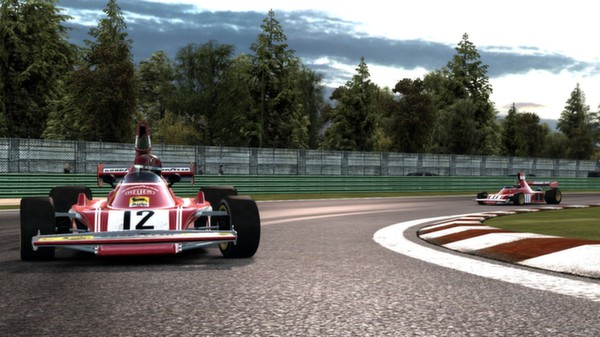
One of the standout features of Test Drive Ferrari Racing Legends is its extensive Ferrari vehicle roster. Players can drive dozens of famous Ferrari models, including classic race cars, Formula One machines, grand tourers, and modern supercars, each recreated with unique handling and performance characteristics.
The game features a historical progression system where events are organized into different decades. As players advance, they unlock increasingly powerful and technologically advanced Ferrari vehicles while learning about the company’s racing legacy.
Races take place on a variety of real-world and fictional circuits, featuring different weather conditions, vehicle classes, and competition formats that challenge driving skills across multiple eras.
The handling model strikes a balance between accessibility and realism, making it approachable for casual players while still rewarding precision, braking control, and proper racing techniques.
With its combination of Ferrari-focused gameplay, historical motorsport content, and diverse vehicle selection, Test Drive: Ferrari Racing Legends offers a unique racing experience dedicated to one of the most legendary names in automotive history.
Before downloading make sure that your PC meets minimum system requirements
Minimum System Requirements
- OS: Windows XP/7/8/10/11
- Processor: Intel Core 2 Duo 1.6 GHz
- Memory: 1 GB RAM
- Graphics: 256 MB Graphics Memory
- DirectX: 9.0c
- Hard Drive: 6 GB HD space
Screenshots

How to Install?
- Download: Get the installer only from the official developer or a verified store.
- Run Setup: Double-click the official .exe file and follow the prompts.
- Default Path: Install to the recommended folder to ensure proper system permissions.
- Update: Run the game launcher to download any official security patches.
- Launch: Open the game via the official desktop shortcut.