Apunkagames Official Site – Games Download For PC ApunKaGames is a best website to download games for PC.
Table of Contents

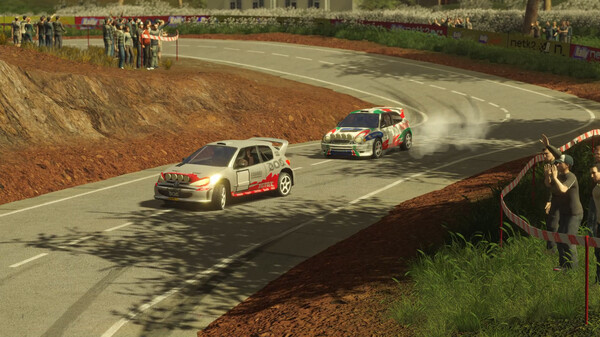
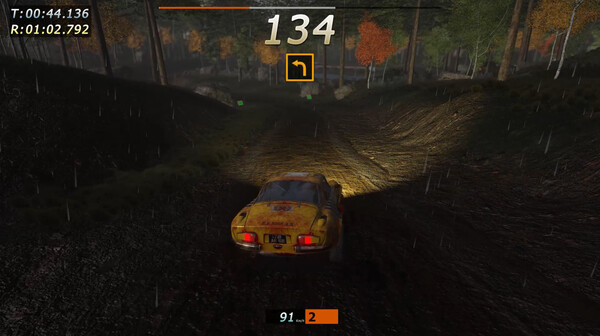
Rally Arcade Classics is a retro-inspired racing game developed and published by NETK2GAMES. Released on September 23, 2024, the title caters to both veteran gamers craving classic arcade nostalgia and newcomers seeking a fast-paced driving challenge. The game aims to capture the spirit of old-school rally titles by combining vibrant 3D visuals with high-speed, action-packed gameplay.
The game boasts an impressive lineup of content, featuring 44 iconic vehicles spanning four distinct decades from the 1970s through the 2000s. Players can push these legendary machines to their absolute limits across 48 thrilling tracks spread across multiple countries. The gameplay structure prioritizes quick, dynamic bursts of racing action over exhausting, hours-long sessions, allowing players to drift through tight turns and master front-wheel, rear-wheel, and all-wheel drive vehicles.
A variety of distinct modes are available to test a driver’s precision and speed. Players must first earn their licenses across specialized tracks before tackling the main Tour mode to earn credits, stars, and top spots on the leaderboards. Additionally, the game includes classic Arcade and Rally modes where players compete neck-and-neck against AI drivers, as well as Chrono and special event modes designed for continuous time-attack challenges.
Before downloading make sure that your PC meets minimum system requirements
Minimum System Requirements
- OS: Windows 7
- Processor: Intel Core i3 2.9 GHz
- Memory: 4 GB RAM
- Graphics: Nvidia GeForce GTX650
- DirectX: Version 11
- Storage: 10 GB available space
Screenshots
How to Install Rally Arcade Classics?
- Download: Get the installer only from the official developer or a verified store.
- Run Setup: Double-click the official .exe file and follow the prompts.
- Default Path: Install to the recommended folder to ensure proper system permissions.
- Update: Run the game launcher to download any official security patches.
- Launch: Open the game via the official desktop shortcut.